# Assemble your custom Apache Karaf with the karaf-maven-plugin
I was quite happy to find out there is a Maven Plugin with which you can assembly a full Apache Karaf and include your own features/bundles.
From time to time I like to test my bundles in a real environment. Because of that the plugin is a great way to save the steps of unzipping a new Karaf, adding my feature and installing it.
So the plugin basically serves my laziness ;-)
But before the lazy part starts (for me and you) we have to do some work to get the plugin running.
I will start to describe the things I figured out. Then I will show you my final configuration and at the end I will talk about the problems I encountered.
Of course you can take a look at the documentation ([here](http://karaf.apache.org/manual/latest/developers-guide/karaf-maven-plugin.html) and [here](http://karaf.apache.org/manual/latest/developers-guide/custom-distribution.html)), too.
### Karaf-assembly
To start your assembly project you just need an empty maven project with the packaging "karaf-assembly" and the plugin, of course.
To configure the features for the plugin (so the features will end up in the Karaf) there are three options:
1. startupFeature
2. bootFeature
3. installedFeature
Here is an example:
```xml
standard
management
camunda-bpm-karaf-feature-minimal
```
All three types result in a different configuration. Since I don't want to copy the documentation I'll give a very brief explanation.
#### startupFeatures
All the bundles from your feature will appear in the startup.properties, copied to system/ and started with the Karaf.
#### bootFeatures
All the bundles from your feature will be copied to system/. The features you listed will appear in org.apache.karaf.features.cfg and installed when starting Karaf. The path to your feature.xml will be added to org.apache.karaf.features.cfg as feature repository.
#### installFeatures
All the bundles from your feature will be copied to system/. The path to your feature.xml will be added to org.apache.karaf.features.cfg as feature repository.
You can see that every kind of \*Features gets a little bit less serious than the one before. Please note that "compile" dependencies in your POM will be treated like a startupFeature.
All the dependencies you want to include have to be ether of type "kar" or have to have the classifier "feature" and type "xml", e.g:
```xml
org.apache.karaf.features
standard
3.0.2-SNAPSHOT
features
xml
runtime
```
Other dependencies will be ignored.
That was all I could figure out about the configuration of the plugin. Now let's have a look at my project.
### My project
As mentioned before my project contains no classes or anything under src/resources. It just has the pom.xml that looks like [this](https://drive.google.com/file/d/0B6fecPw2wyR9Wml2MWZsanh0UEE/view?usp=sharing) (Google Drive link).
I added a small shell script because the karaf start file wasn't executable and because I didn't want to move to target/assembly/... every time. Also I had a small problem with Java (see following heading).
The script looks like this:
```bash
export JAVA\_HOME=$(/usr/libexec/java\_home -v 1.6)
chmod 777 ./target/assembly/bin/karaf
./target/assembly/bin/karaf start
```
Nothing fancy ;-) So, that's already all about my project. Finally, I want to tell you about the problems I faced.
### Issues
#### Plugin version
I had the problem that when a feature contained nested features the nested ones wouldn't be resolved. It took me a while and some remote debugging to find the problem. After I asked in the [mailing list](http://mail-archives.apache.org/mod_mbox/karaf-user/201410.mbox/browser) I was told that the problem existed in my version (3.0.1) and is fixed in the next one.
So you should definitely use the 3.0.2-SNAPSHOT version despite the fact that it's a snapshot. [Jean-Baptiste](https://twitter.com/jbonofre) did some great improvements in that version. The logging is way better and you can have nested features.
#### Ordering of dependencies
After upgrading my version I could see that all of my bundles were successfully installed into the system/ directory. But after starting my Karaf they weren't deployed. The "mvn:" URL for my feature was missing in the org.apache.karaf.features.cfg "featuresRepositories" property.
I found out that the problem was in the order of my dependencies.
My feature was the first dependency and then followed the Apache Karaf dependencies. Like this:
```xml
org.camunda.bpm.extension.osgi
camunda-bpm-karaf-feature
1.1.0-SNAPSHOT
features
xml
runtime
org.apache.karaf.features
framework
3.0.2-SNAPSHOT
kar
org.apache.karaf.features
standard
3.0.2-SNAPSHOT
features
xml
runtime
```
The problem is that the framework Kar contains all the configuration files. So when the plugin tries to update the config-file with my feature it is not present. So be careful that the framework kar is your first dependency.
#### Java 8
_Edit:_ As Jean-Baptiste [told me](https://twitter.com/jbonofre/status/520477787153793024) (thank you again) the Java 8 problem is only related to version 3.0.1 which I can hereby confirm. So if you have followed my advice and use 3.0.2 you can skip this part.
Being the young and hip person I am ;-) my MacBook was already running Java 8. When I assembled and started a Karaf it would start without a problem (at least it seemed so). But hitting tab only showed this small amount of commands:
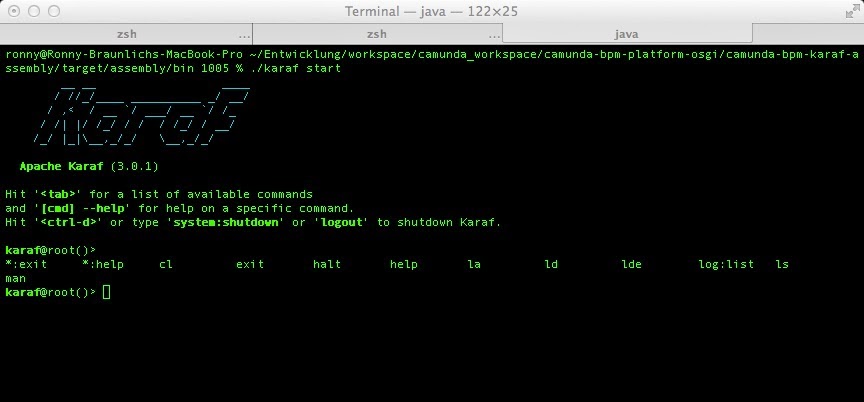
Every command, even help, would answer with a NullPointerException. The NPE itself looked like this:
```
2014-10-07 16:55:55,232 | ERROR | Local user karaf | ShellUtil | 37 - org.apache.karaf.shell.console - 3.0.1 | Exception caught while executing command
java.lang.NullPointerException
at org.apache.felix.gogo.runtime.Reflective.invoke(Reflective.java:61)\[37:org.apache.karaf.shell.console:3.0.1\]
at org.apache.felix.gogo.runtime.CommandProxy.execute(CommandProxy.java:82)\[37:org.apache.karaf.shell.console:3.0.1\]
at org.apache.felix.gogo.runtime.Closure.executeCmd(Closure.java:477)\[37:org.apache.karaf.shell.console:3.0.1\]
at org.apache.felix.gogo.runtime.Closure.executeStatement(Closure.java:403)\[37:org.apache.karaf.shell.console:3.0.1\]
at org.apache.felix.gogo.runtime.Pipe.run(Pipe.java:108)\[37:org.apache.karaf.shell.console:3.0.1\]
```
At first I thought something was missing. But checking the logs again, looking at what happened during startup, revealed some IllegalArgumentExceptions:
```
2014-10-07 16:53:23,402 | INFO | FelixStartLevel | ServiceRecipe | 19 - org.apache.aries.blueprint.core - 1.4.0 | Unable to create a proxy object for the service .component-1 defined in bundle org.apache.karaf.deployer.features at version 3.0.1 with id 25. Returning the original object instead.
java.lang.IllegalArgumentException
at org.objectweb.asm.ClassReader
```
I found out (thank you internet) that this is a Java 8 related problem. The command
```
export JAVA\_HOME=$(/usr/libexec/java\_home -v 1.6)
```
solved my problem. To always start my Karaf with Java 6 I added this line to my start script (see previous heading).
That was all about my karaf-maven-plugin experience. I am sure there are some more hidden things I couldn't figure out. I hope my experience will be useful for someone else.
Have fun with your own custom Karaf!